


Furnished Finder
3.92.17K Reviews
App Specs
- Version
- 1.9.1
- Updated On
- License
- Free
- Downloads
- 100,000+
- Developer
- Furnished Finder, LLC
- Categories
- Travel & Local
- Platform
- Android
Screenshots

 Analysis by AppCompare
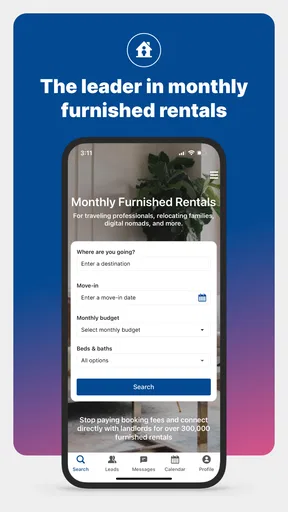
Finding a furnished place for a month is a very different task from booking a hotel for a weekend. I tried Furnished Finder with that longer-stay mindset, and I found an app that makes the search feel more focused, especially for travel nurses, relocating workers, students on temporary placements, and anyone who needs a ready-to-live-in home rather than a short hotel stay. It is a free Travel & Local app from Furnished Finder, LLC, and its main appeal is connecting people with furnished monthly rentals without booking fees.
That sounds simple, but the practical experience depends heavily on how carefully you search and communicate. This is not the kind of app where I would choose the first attractive photo and expect the entire move to take care of itself. The strongest results came when I treated it as a housing research tool: I checked the location, compared the total monthly cost, read the listing details closely, and contacted the host with specific questions before making plans.
The app has been available since February 27, 2019, and its current version is 1.9.1. It works on Android 7.0 and later, carries an Everyone age rating, and has passed the point where it feels like an experimental newcomer. Its average score is 3.9 from around 4.3 thousand ratings, while more than 100 thousand people have installed it. Those figures suggest a useful but not universally smooth experience, which matches my impression: the idea is valuable, while the quality of individual listings and the ease of completing a search can vary.
Where the search usually gets stuck
The first point of friction is deciding what “monthly rental” really means for your situation. A listing can look perfect on a map and still be unsuitable if the available dates, included furnishings, parking arrangement, or household rules do not match your needs. I would not begin by browsing casually. I would first write down the exact start date, expected length of stay, work location, maximum realistic budget, and the amenities I cannot compromise on.
This matters particularly for travel nurses and other shift workers. A place that is only a short drive away during the day may be much less convenient after a night shift, and a neighborhood that looks close on a broad map may not offer the same practical commute at the hours you need. Furnished Finder is useful for narrowing the housing search, but I still regard the listing as the opening conversation rather than the final answer.
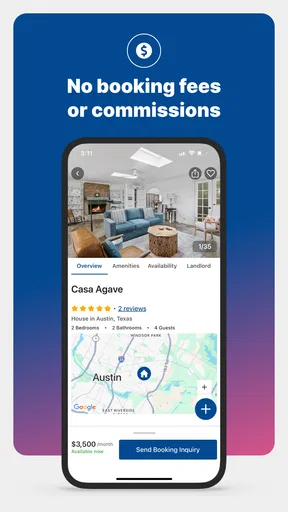
Another common sticking point is interpreting the monthly price. The absence of booking fees is a clear advantage, but it does not mean every possible housing cost is represented by one simple number. Before treating a listing as affordable, I would ask whether utilities, deposits, cleaning charges, parking, internet, or other recurring costs are included. I would also confirm whether the displayed amount applies to the exact dates I need. A lower headline figure can stop being a bargain once the practical extras are counted.
Photos can create a similar trap. They help me judge the general style and condition of a home, but they do not answer questions about noise, storage, mattress quality, natural light, shared spaces, or how private the entrance really is. For a stay lasting several weeks, those details matter more than decorative furniture. I found it more useful to turn every uncertainty into a direct question than to assume that an attractive image represented the whole experience.
Worth Reading Before You Choose

Flipboard Shows What News Apps Must Do Beyond the Feed

Switching to Android Auto Means Rethinking Your Driving Routine

Google Calendar Makes a Crowded Week Easier to Manage

Ludo King Makes the Most of the Minutes Between Plans

Baby Panda World Brings Quick Play to Modern Phones, but Its Game Library Feels Busy

ESPN’s Live Game View Makes Following Close Games Easier
Search results can also feel less useful when the location is entered too broadly. If I search an entire city, I may spend time comparing homes that are technically nearby but impractical for work. A better approach is to search around the hospital, office, campus, or training site first, then widen the area only if the initial results do not fit the budget. This reduces the temptation to choose based on appearance alone.
Questions worth asking before you commit
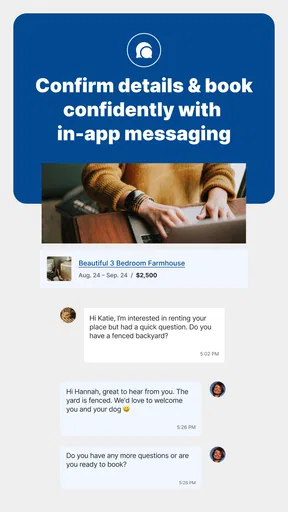
I would send a short, organized message instead of several scattered questions. I normally include the dates, the reason for the stay, the number of occupants, and a compact checklist: Is the unit private or shared? Are utilities and internet included? Is parking available? What furniture and kitchen equipment are provided? Are there house rules that affect working nights or receiving visitors? Can the host confirm the total expected cost for the full stay?
This workflow has a less obvious benefit: it makes it easier to compare replies. If each host receives the same basic questions, I can judge not only the property but also how clearly and promptly the host communicates. For a temporary home, that communication is part of the value. A beautiful listing with vague answers is less attractive to me than a modest place whose arrangements are explained clearly.
I would also avoid sending sensitive personal information too early. The app helps begin contact, but normal caution still applies to any rental search. I would keep early messages focused on the accommodation and dates, verify the identity and terms of the person I am dealing with, and read any agreement carefully before transferring money or arranging a move. The absence of booking fees should not be confused with the absence of responsibility on the renter’s side.
Setup checks that save time later
My first setup check is compatibility. Anyone using an older Android phone should confirm that it runs Android 7.0 or newer. That requirement is modest, but an outdated device can create confusing behavior that looks like an app problem when the real issue is the operating system. I would also keep the app updated to version 1.9.1 where possible, because basic stability problems are worth ruling out before spending time rebuilding a search.
The next check is account and contact information. Since the useful part of this service depends on communicating with property owners or managers, I would make sure the email address and phone details associated with the account are current and that notifications are not being silently blocked. If a reply seems missing, I would check the app again rather than assuming the host has ignored the message. Notification settings, battery-saving restrictions, and a weak connection can all interrupt an otherwise normal exchange.
I would also prepare the search before opening the app. Keep the destination, dates, stay length, workplace address, and budget in a note on the phone. This sounds basic, but it prevents a common mistake: changing one search detail without noticing that another has become unsuitable. When comparing rentals, I would record the listing name, approximate location, monthly amount, included costs, and the questions still awaiting answers.
One of the most useful setup habits is separating “must have” from “would like.” A private bathroom, reliable internet, parking, or proximity to a hospital may be essential. A balcony, larger kitchen, or stylish living room may simply be preferable. Making that distinction before searching helps me avoid rejecting practical options for cosmetic reasons or accepting an attractive home that fails an important daily requirement.
Because this is a monthly-rental app rather than a conventional hotel-booking tool, I would allow extra time for the human part of the process. A hotel platform usually presents a standardized room, a clear nightly rate, and an immediate reservation flow. Here, the value comes from finding a more suitable temporary home, but the trade-off is that availability and terms may require direct confirmation. If I needed a room tonight, I would look at a hotel or a short-stay booking service first.
How I check a listing instead of just liking it
I start with the map and commute, then move to the written description. I look for clues about whether the property is a full private unit, a room in a shared home, or another arrangement. I check what “furnished” appears to mean in practice: a bed and sofa may be enough for one person, but someone staying for work may also need a usable desk, cooking equipment, laundry access, and storage for several weeks.
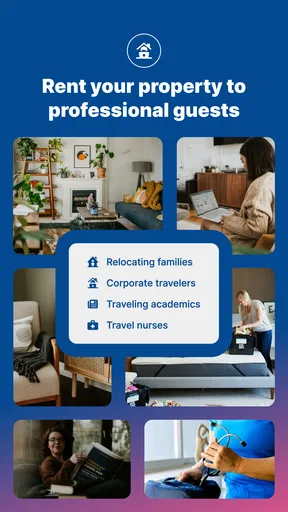
I then compare the stated amenities with my own routine. A travel nurse may care more about a quiet sleeping environment and parking than about a large entertainment area. A relocating family may need separate sleeping spaces and nearby daily services. A student may prioritize a manageable commute and internet access. The same listing can be excellent for one person and unsuitable for another, so I would not rely on the app’s category alone to make the decision.
I also look for contradictions. If the photos suggest one layout but the text describes another, I ask for clarification. If the availability seems unusually convenient, I confirm the exact move-in and move-out dates. If the monthly amount appears to exclude obvious costs, I ask for a complete estimate. These checks are not signs that the app has failed; they are part of renting a real home through a marketplace-style service.
Recovering when the workflow breaks
When a search becomes confusing, I find it better to simplify rather than repeatedly tapping through the same screens. I return to the basic criteria, run a narrower search, and compare only a few realistic options. If results are empty, I widen one variable at a time: first the search area, then the dates if they are flexible, then secondary amenities. Changing everything at once makes it impossible to know what solved the problem.
If the app appears frozen or a result does not load, I would first check the internet connection and try again later. Switching between Wi-Fi and mobile data can reveal whether the issue is local connectivity. I would also close and reopen the app, make sure the operating system is supported, and confirm that the installed version is current. These are ordinary steps, but they are safer and more useful than repeatedly submitting the same request or assuming that a listing has disappeared permanently.
For a missing reply, I would check the conversation details, notification settings, and contact information before sending another message. A polite follow-up with the original dates and key question is more effective than a vague “Are you still available?” If the host does not answer clearly, I move on. The app can help me discover housing, but it cannot turn an unresponsive contact into a dependable landlord.
A practical recovery technique is keeping a small shortlist outside the app. I note the property location, price, dates, and unresolved concerns in my phone’s notes. This protects me from starting over if a search changes or a listing is no longer visible. It also makes comparisons more rational: after looking at many furnished homes, I can easily forget which one included parking or had a shared kitchen.
If I am arranging a move for work, I would not wait until the last possible moment to contact hosts. Monthly rentals involve availability, personal responses, and sometimes timing that is less immediate than hotel reservations. Starting earlier gives me room to ask questions, compare alternatives, and walk away from a poor fit without putting the entire relocation at risk.
When a different approach is more efficient
Furnished Finder is most convincing when the stay is long enough for a furnished home to make sense and when I am willing to evaluate the details myself. It is less suitable for a one-night stop, a spontaneous weekend, or a trip where I need instant confirmation and standardized cancellation handling. In those cases, a hotel app or a conventional short-term booking service is usually easier.
It may also be the wrong choice for someone who wants a completely managed relocation experience. If I needed movers, utility transfers, guaranteed maintenance response, or a single company responsible for every part of the stay, I would look for a dedicated corporate-housing provider or relocation service. The app is better at helping me locate possible furnished housing than at replacing every part of the rental process.
On the other hand, it has a meaningful advantage over ordinary hotel searches for people who dislike living out of a suitcase. A monthly furnished rental can offer a more normal routine, with a kitchen, living area, and a setting that may feel more like home. For a nurse on a temporary assignment or a worker waiting for a permanent move, that difference can be more important than a polished hotel lobby.
When the app is not the cause
Some frustrations come from the nature of temporary housing rather than the software. Availability changes quickly, hosts may need time to confirm dates, and two properties in the same city can have completely different rules. If a listing does not match expectations, that may reflect an incomplete description or a change in the property’s circumstances, not necessarily a technical failure.
Location accuracy is another area where I would use judgment. A map can show distance, but it cannot fully explain traffic, public transport reliability, hills, parking difficulty, or whether the route feels practical after a long shift. I would check the commute independently and, if possible, ask the host about the normal travel pattern. This is especially important when the listing is being considered because it appears close to a hospital or workplace.
Budget surprises also require a distinction between app and rental terms. If the final amount differs from the first figure I noticed, I would compare the written agreement, included services, deposit terms, and dates before blaming the search tool. The right response is to request a clear total in writing and decline if the arrangement remains vague. A free app can remove booking fees, but it cannot remove the need to understand a rental contract.
I would take the same approach with comfort problems. Noise, temperature, mattress firmness, and shared-space etiquette are personal and often difficult to judge from a listing. The best prevention is to ask specific questions before committing. If quiet sleep is essential, I would ask about nearby roads, other occupants, and quiet hours rather than assuming that “peaceful” means the same thing to everyone.
Finally, I would remember that the app’s Everyone rating makes it accessible to a broad audience, but accessibility is not the same as suitability for every rental situation. Younger users, first-time renters, and people moving under pressure may need a trusted friend or family member to review the terms with them. That extra check is sensible whenever the stay involves a large commitment or an unfamiliar host.
My practical verdict after using it
I see Furnished Finder as a focused starting point for people who need furnished housing for a month or longer, particularly travel nurses and workers on temporary assignments. Its free access and no-booking-fee approach make it appealing, while the housing format can be more comfortable than repeating hotel stays. The developer, Furnished Finder, LLC, has built the experience around a real problem: finding a furnished place that fits a temporary life rather than a short vacation.
My recommendation comes with a clear condition: use it actively, not passively. Search near the actual workplace, separate essential features from nice extras, confirm dates and total costs, and ask direct questions about privacy, utilities, parking, furnishings, and house rules. Keep a shortlist and give yourself time for replies. Those habits make the service considerably more useful than simply scrolling through photos.
I would skip it when I need an immediate, guaranteed reservation, when my stay is only a few nights, or when I want a fully managed housing arrangement with little direct communication. For those needs, a hotel platform or professional corporate-housing provider may be a better fit. I would also avoid committing to any listing whose terms remain unclear, no matter how convenient the location appears.
For the right user, though, the trade-off is worthwhile. The app does not eliminate the work involved in renting a temporary home, but it can make that work more targeted. My final impression is positive but practical: the real strength is not effortless booking; it is giving long-stay renters a more relevant place to begin their search. If you approach each listing with a checklist and verify the details before paying or moving in, Furnished Finder is a useful companion for building a temporary home away from home.
Pros
- Focuses on medium-term rentals for traveling professionals
- Search filters make it easier to find suitable furnished housing
- Listings often include practical details for extended stays
- Useful for nurses
- doctors
- and other mobile workers
- Can help avoid long-term lease commitments
Cons
- Availability may be limited in smaller cities
- Rental prices can be higher than standard local leases
- Some listings may require additional screening or deposits
- Messaging response times depend on individual landlords
- Users should verify listing details before sending payment
FAQs for Furnished Finder
What is Furnished Finder, and who is it designed for?
Furnished Finder is a rental marketplace focused on furnished, medium-term housing, typically for stays of 30 days or longer. It is especially popular with traveling nurses, medical professionals, corporate travelers, relocating workers, students, and people between homes. Unlike a traditional hotel-booking app, it generally helps renters connect directly with property owners or managers, so users should review each listing and communicate with the landlord before making arrangements.
Can I book and pay for a property directly through Furnished Finder?
Furnished Finder primarily helps renters discover furnished rentals and contact landlords; it is not necessarily a full-service booking platform for every listing. Payment methods, deposits, lease signing, screening, and move-in procedures can vary by property owner. Before sending money, carefully confirm the rental agreement, total costs, cancellation terms, identity of the landlord, and whether any payment request is handled through a secure and verifiable process.
Are the listings on Furnished Finder verified and safe?
Furnished Finder may provide listing information and landlord-related tools, but renters should not assume that every property has been independently inspected or that every transaction is risk-free. Read the complete listing, check photos and amenities, ask for the exact address, request a video tour when an in-person visit is impossible, and verify the owner or manager. Never ignore pressure to pay quickly or requests that seem unusual.
What types of rentals and lease lengths are available?
The platform is mainly intended for furnished monthly rentals, with many properties offering stays of one month or longer. Availability can include private rooms, apartments, condominiums, houses, and extended-stay accommodations near hospitals or business centers. Lease length, utilities, pet policies, parking, cleaning fees, and furnished amenities differ by listing, so contact the landlord to confirm what is included before committing.
Is Furnished Finder free for renters, and what costs should I expect?
Renters can generally browse available properties and search for suitable housing without paying a traditional hotel-style booking fee through the platform. However, the rental itself may involve monthly rent, security deposits, application or screening charges, cleaning fees, service costs, pet fees, and utility expenses. Pricing and policies are set by individual landlords, so compare the full move-in and monthly cost rather than relying only on the advertised rent.


